Capturing the Best Pets Universe Photos: A Complete Guide
Discover how to capture and share stunning Pets Universe photos in this Roblox hit. Learn about rare pet visuals, camera tips, and the latest [🍄UPD] content.
Published:
Table of Contents
Developing a visually stunning collection in Roblox is a core part of the gameplay experience, and finding the best pets universe photos has become a priority for the community. Whether you are a veteran collector or a newcomer just starting your journey in the world created by Lip Builds, documenting your progress is essential. Sharing your pets universe photos allows you to showcase your rarest hatches, participate in community trading discussions, and preserve memories of the game's evolving landscape. In this comprehensive guide, we will explore the artistic side of the game, providing you with technical tips to improve your screenshots and insights into the visual rarities that make this experience unique.
Quick Answer
The best way to obtain high-quality pets universe photos is by using the Roblox "Freecam" mode (Shift + P in private servers) or by disabling the GUI settings to ensure a clean shot of your pets. Focus on high-rarity pets from the recent [🍄UPD] Mushroom Update to capture the most trending content for the community.
The Visual Appeal of Pets Universe: Why Aesthetics Matter
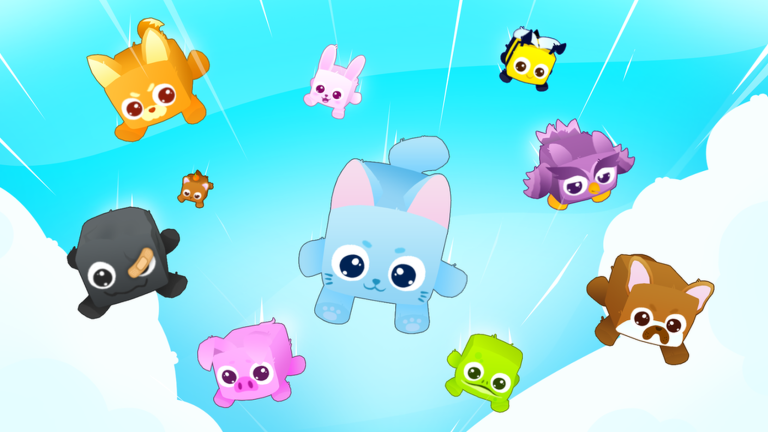
In the crowded market of Roblox pet simulators, Pets Universe stands out due to its vibrant art style and creative character designs. Developed by Lip Builds, the game emphasizes the visual progression of your companions. As pets evolve or reach higher tiers, their physical appearance changes, often gaining glowing auras, unique textures, or oversized features that look incredible in screenshots.
Taking pets universe photos isn't just about vanity; it is a form of social currency within the Roblox ecosystem. When a player hatches a "Secret" or "Legendary" pet, the first thing they do is snap a photo to post on Discord or X (formerly Twitter). This visual proof serves as a badge of honor and can even help in the trading market, as high-quality images make your offers more appealing to potential trading partners.
The game’s environment also plays a massive role. From lush green starter zones to the more exotic, themed areas introduced in updates, the backdrop of your photo can tell a story. With the recent [🍄UPD] inclusion, the mushroom-themed aesthetics have introduced a palette of neon purples and organic shapes that provide a perfect contrast for bright, colorful pets.
Technical Guide: How to Take Professional Pets Universe Photos
Capturing the perfect shot requires more than just hitting the "Print Screen" button. Roblox offers several built-in tools that can elevate your pets universe photos from basic screenshots to professional-looking game photography. Understanding the technical side of the Roblox engine will give you a significant advantage.
Utilizing the Roblox UI Toggle
The biggest obstacle to a clean photo is the User Interface (UI). Buttons for the shop, inventory, and settings often clutter the edges of the screen. To take clean pets universe photos, you should look for the game’s internal "Hide UI" setting if available, or use the standard Roblox shortcut.
Feature
Shortcut/Method
Impact on Photo Quality
Hide HUD
Ctrl + Shift + G (Universal)
Removes all screen clutter for a cinematic look.
Screenshot
PrtSc or Windows + Shift + S
Allows for quick captures during active gameplay.
Freecam
Shift + P (Private Servers)
Enables a floating camera for unique angles and close-ups.
Graphics Level
Settings > Manual > Level 10
Maximizes lighting, shadows, and particle effects.
Lighting and Positioning
Lighting in Pets Universe changes depending on the zone you are in. For the best results, position your pet in an area with "Soft Lighting"—usually found in the starter village or near glowing flora in the Mushroom zone. Avoid standing directly under harsh, vertical light sources, as this can create unflattering shadows on your pet's model.
When taking pets universe photos, remember the "Rule of Thirds." Instead of placing your pet directly in the center of the frame, try placing them slightly to the left or right. This creates a more dynamic composition that feels like a professional promotional image rather than a casual snap.
Rarity and Visual Tiers: What to Photograph
Not all pets are created equal when it comes to visual impact. The community generally categorizes pets by their rarity, but for photography, the "Visual Tier" is what matters. A "Shiny" version of a common pet might actually look better in a photo than a standard Epic pet because of the added particle effects.
According to community reports, players are currently obsessed with the visual effects introduced in the latest update. The [🍄UPD] Pets Universe! 🐾 version has added several pets with bioluminescent properties. These are particularly popular for night-time photography within the game.
Popular Pet Categories for Photography
Elemental Pets: These often feature fire, water, or electricity effects that look stunning in motion-blur shots.
Giant/Huge Pets: Their sheer scale makes for impressive "flex" photos when stood next to a standard-sized avatar.
Mushroom Themed Pets: The latest trend, featuring organic textures and pastel color schemes.
Pet Rarity
Visual Characteristics
Photography Difficulty
Common
Solid colors, simple shapes
Easy (Good for practice)
Rare
Patterned textures, small auras
Moderate
Legendary
Glowing parts, unique animations
Hard (High movement)
Secret
Full-body auras, trail effects
Expert (Requires timing)
The Impact of the [🍄UPD] Mushroom Update on Visuals
The developer, Lip Builds, recently pushed a significant update that changed the visual landscape of the game. The "Mushroom Update" isn't just about new pets; it’s about a complete aesthetic overhaul of the late-game zones. For those looking to update their gallery of pets universe photos, this zone is the current "gold mine."
The environment features giant, glowing fungi that act as natural light sources. This creates a "Cyber-Natural" look that is very popular on social media. Players have noted that the contrast between the dark purple ground and the neon caps of the mushrooms provides the perfect saturation for high-end photography.
Pro Tip for the Mushroom Zone
Use the "Low Angle" technique. Position your camera near the ground looking up at your pet with a large mushroom in the background. This makes your pet look heroic and captures the scale of the new environment perfectly.
Community Trends and Sharing Your Work
Once you have captured your pets universe photos, the next step is sharing them with the wider community. The Pets Universe fandom is highly active on platforms like Discord and Reddit. Engaging with these communities can provide you with feedback on your photography and even help you find rare pets to photograph that you might not own yet.
Where to Share Your Photos
Official Roblox Group: Lip Builds often checks the group wall for fan creations.
Discord Show-Off Channels: Most pet simulator Discords have a specific channel for "Flexing" or "Media."
Community Wikis: Contributing high-quality images to the game's fan-run wiki is a great way to help the community.
"Player experience" suggests that the most liked photos are those that tell a story. Instead of just showing a pet in the inventory, show the pet "in the wild," perhaps interacting with a chest or standing next to a friend's pet. Collaborative pets universe photos are becoming a major trend, where groups of players line up their rarest companions for a "squad shot."
Avoiding Common Mistakes in Game Photography
Even with the best pets, a few common errors can ruin your pets universe photos. One of the most frequent mistakes is leaving the "Chat Box" open. While it might seem minor, a wall of text in the top-left corner distracts the viewer from the central subject. Always ensure your chat is closed before snapping the shutter.
Another mistake is "Clipping." Roblox physics can sometimes cause pets to clip through the floor or walls. While this is fine during normal gameplay, it looks messy in a photo. Take a moment to move your character slightly to reset the pet's pathfinding, ensuring they are standing firmly on the ground.
Error
Consequence
Fix
Low Graphics
Jagged edges, no shadows
Turn Graphics to Manual Level 10
Chat Visibility
Text clutter
Press '/' then click away or use UI toggle
Bad Angle
Pet looks flat or distorted
Use 'Freecam' to find a level eye-line
Default Clothing
Ruins the "theme"
Match your avatar's outfit to your pet's color
Future Visuals: What to Expect from Lip Builds
As the game continues to grow (referencing the official Roblox game page), we can expect even more complex visual effects. Community leaks and developer teasers suggest that future updates may include "Aura Customization," which would allow players to change the visual flair of their pets. This would add a whole new layer of depth to pets universe photos, as no two pets would look exactly the same.
The developer's focus on "Builds" (as implied by the name Lip Builds) suggests that the environments will only get more detailed. For the aspiring game photographer, this means a constant stream of new "studios" and "backdrops" to explore. Staying updated with the game's version history is key to being the first to capture new content.
Strategy for a Growing Photo Collection
If you are serious about documenting your journey, consider creating a dedicated folder on your PC or a specific album on your phone for your pets universe photos. Organize them by "Version" or "Update." For example, have a folder for "Pre-Mushroom Update" and one for "Post-Mushroom Update." This allows you to see how the game's graphics and your own collection have improved over time.
This chronological approach is also highly valued by the community. "Legacy Photos" of pets or zones that have since been removed or revamped can become quite valuable for historical purposes within the fandom.
Avoid Scams
When sharing photos for trading, never click on external links sent by others claiming to show "better photos." Only use official platforms and trusted community hubs to share your pets universe photos.
Conclusion: The Art of the Universe
Pets Universe is more than just a clicking game; it is a visual playground. By mastering the art of the screenshot, you contribute to the game's culture and create a lasting record of your achievements. Whether you are capturing the neon glow of the Mushroom Update or the simple charm of a starter dog, every photo is a piece of the game's history.
Remember to experiment with different lighting, utilize the Roblox technical shortcuts, and always keep an eye out for the next big update from Lip Builds. Your gallery of pets universe photos is a testament to your dedication and your eye for detail in the vast Roblox universe.
Frequently Asked Questions
How do I take high-quality pets universe photos on mobile?
On mobile, you can't use the Shift+P Freecam. Instead, use two fingers to pinch and zoom as close as possible to your pet. Then, use your device’s built-in screen capture tool (usually Power + Volume Down). For the best quality, ensure your Roblox app settings have "Graphics Quality" set to the maximum allowed by your device.
Where can I find the rarest pets for my pets universe photos?
The rarest pets are usually found in the latest unlocked zones, such as the Mushroom zone in the [🍄UPD] version. You can also find them in the "Secret" eggs which have a very low drop rate. If you don't own them, you can visit the "Trading Hub" where players often display their best pets, providing a great opportunity to take pets universe photos of pets you haven't hatched yet.
Why do my pets universe photos look blurry?
Blurriness is often caused by "Motion Blur" settings or low resolution. In the Roblox settings menu, check if you have any post-processing effects enabled that might be interfering. Additionally, if you are moving while taking the photo, the pet may appear out of focus. Always stand still for at least two seconds before capturing your pets universe photos to allow the textures to load fully.
Can I use pets universe photos for my own content?
Generally, capturing screenshots for personal use, social media sharing, or fan-made guides is encouraged by the Roblox community. However, always credit the developer, Lip Builds, if you are using the images for larger projects like YouTube videos or blog posts. Using pets universe photos to promote the game helps the community grow!